Shopping Online e-Commerce has made everything faster, easier, and more Convenient. Whether its daily items or high-end electronics, the use of online payment systems such as cards, UPI, net banking, and e-Wallets has increased dramatically. But guess what? This convenience can also be a threat. Data breaches, phishing, web impersonation, and malware can put your payment information at risk if you are not watching out.
It has become imperative for one to be aware of how to safeguard their financial transaction information while making payments online. This article will enlighten you on the measures you should take to ensure that your financial transaction information is protected.
Understanding the Common Risks in Online Payments
Before you are taught how to protect your credit information, you must know from where the threats are coming. Payment fraud is not usually committed due to vulnerabilities in the payment method itself—but rather because consumers are fooled.
Common Risks Include:
- Fake or Lookalike Shopping Websites.
- Phishing emails/sms and links sent via WhatsApp.
- Malware or Spyware in devices.
- Unsecured Public Wi-Fi Networks.
- As Data breaches from untrusted sellers.
More often than not, hackers will attempt to steal credit card numbers, CVV, OTPs, UPI PINs, or log-in details. It’s essential to be aware of these risks in order to make safe e-commerce transactions.
Access Secure Websites and Trusted Platforms Only
One of the most basic methods for protecting your financial information is by conducting your online transactions with only trusted websites Shopping. Trusted online platforms spend considerable amounts of money on their protection, whereas fake or poorly maintained websites are likely to lack such protection.
Always try to check:
- The website url begins with https://
- A padlock symbol appears in the browser bar.
- The domain name is spelled properly.
Refrain from clicking on random links from deals shared via messages or social media, especially when these links lead to other websites that are not familiar to the user. When you spot a too-good-to-be-true deal, always check the offer from the website.
Always Choose Safer Payment Methods
Not all payment systems are of equal risk. There are varying protections and dispute resolution processes among different payment systems.
Payment Options & Comparison of Security
| Payment Method | Safety Level | Reasons |
|---|---|---|
| Credit Cards | High | Chargeback and fraud protection |
| UPI Apps | High | PIN-based & device-linked |
| Wallets | Medium – High | No direct card |
| Net Banking | Medium | Bank authentication layers |
| Debit Cards | Medium | Limited dispute |
| Cash on Delivery | Very High | No digital payment risk |
In all circumstances, instead of using the direct debit cards, it is always advisable to use credit cards, UPI, or wallets, which provide greater protection in the event of fraud.
Do Not Share OTP, PIN, or Cards
This will sound obvious, but it’s still the most common reasons people lose there money online.
Remember:
- Never will a bank or an exchange ask for your OTP.
- UPI PINs are completely private.
- The numbers on the CVV card should never be shared.
Applications used for sharing the screen may reveal confidential data Scammers will pretend to be customer support representatives while playing on urgency. In cases where you feel pressured to “verify” your payment information, do not proceed. This is most likely a scam. Shopping
Use Secure Internet Connection when Transacting
Public Wi-Fis in cafes, malls, airports, and hotels are very convenient—but also dangerous. Public Wi-Fis are unsecured networks that can be intercepted.

If you need to shop online, here are:
- Conduct your internet activities using your mobile data and avoid using public Wi-Fi connections.
- Do not enter your payment information on public networks.
- Never store credit card information on public WiFi.
A few minutes of convenience are not worth risking loss of financial information.
Enable Two-Factor Authentication and Alerts
Additional security measures minimize the risk of unauthorized transactions.
You should Know:
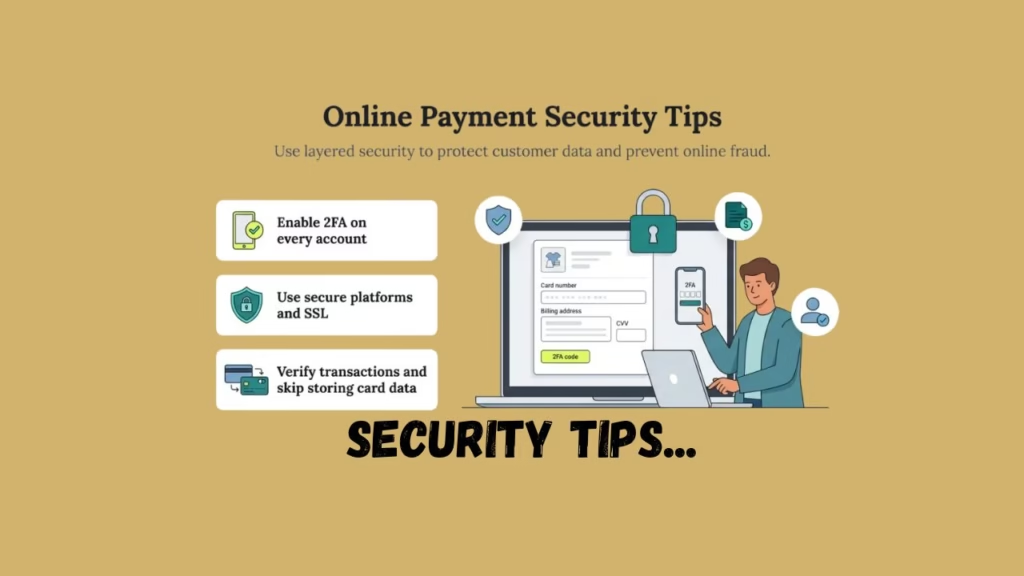
- Turn Two-Factor Authentication (2FA) on for online banking/ wallet apps.
- Enable Instant SMS/Email Alerts on Transactions.
- Establish a daily limit for cards and UPI.
These features ensure that even if an individual manages to get their hands on your card or account, you are immediately notified to take swift action.
Keep Your Devices Secure & Updated
Your gadget is as vital as the website you are using. Old phones and laptops may pose threats of malware and data theft.
Best Practices:
- Ensure that your OS and applications are kept up-to-date.
- Apps to be downloaded through official websites only.
- Refrain from clicking on suspicious links as well as downloading anything.
- Use Screen Lock, Fingerprint Unlock, or Face Unlock.
Do not use hacked apps or unofficial softwares, as they may violate security safeguards.
Be Careful with Saved Cards and Autofill
You can store cards and autofill to make purchases faster, but it also adds a risk of being hacked.
To avoid danger:
- Only save your cards on trusted platforms.
- Use platform-level authentication for saved cards.
- Updating and checking stored payment methods.
- Prevent storing credit card information in browsers.
“Convenience should never come at the cost of security.”
Evaluate Seller Trustworthiness and Return Policies
Even on a large platform, the individual seller is important. “Fraudulent sellers” could steal a customer’s information, for example, by giving false information about a parcel’s.
Before Buying:
- Check seller ratings and reviews.
- Read return and refund conditions well.
- Do not involve unproven sellers with no feedback.
A trustworthy seller means there are no disputes and misuse of data.
From the statements offered by the monitor, the proposed
Despite the fact that all possible precautions are being taken, sometimes errors may occur. The most important thing is how speedily you respond. Shopping

Make It a Habit to:
- Regularly review statements from bank and cards.
- All unknown transactions must be reported immediately.
- Prevent block cards and UPI access if any suspicious activities observed.
Most banks and services have zero fraud liability if fraud is reported quickly. Shopping
Conclusion: Online Payment Security is a Habit
Securing your financial information while shopping online does not necessarily depend on your technical know-how but on your awareness and self-discipline. By being cautious about the sites you shop from, employing more secure ways of making online payments, keeping Shopping your gadgets up to date, and being vigilant about online scams, you will be better protected.
Online Shopping: It’s safe if done in a smart way. The Shopping trick is to handle credit card information like precious items in a house—that’s, give it to nobody, keep it secured in a safe place, and keep tabs on it. With a few smart practices in place, you can protect yourself from getting into serious money troubles.
For More Information You Can Visit our Page
Frequently Asked Questions (FAQs)
Is it safe to enter card details while shopping online?
You can shop safely online by selecting reliable websites, which have protected payment systems, and you should stay away from public Wi-Fi networks.
What is the safest payment method for online shopping?
Credit cards, together with UPI apps, and wallets provide better security because they offer improved fraud protection systems.
Can banks refund money if online payment fraud happens?
Most banks provide zero-liability protection when customers report fraud activities before any financial damage occurs.
Should I save my card details on shopping websites?
You should only save your information on trustworthy websites which require you to prove your identity. Through their security system.